Synopsis #
Configure two OpenBSD frontends to terminate HTTPS and distribute requests to healthy application servers. CARP moves the shared service IP to the standby if the active frontend fails. Unlike PF NAT or DSR , relayd accepts the client connection and opens a separate connection to the backend.
The example uses TLS from the client to relayd and plain HTTP on an isolated backend network. If the backend network is not trusted, protect it or configure TLS between relayd and the backends. Client TLS protects only the connection to relayd.
Prepare the Pair and Backends #
Use the active/standby pair from the redundant gateway guide
: frontend VIP 198.51.100.100, backend gateway 10.10.10.1, and an isolated pfsync link. Run relayd on both nodes. Keep their forwarding policy and application configuration consistent.
Prepare the two HTTP servers from the NAT example
, at 10.10.10.11 and 10.10.10.12. Each serves /health with HTTP 200 when ready. Add an API listener on port 8080 to each server’s /etc/httpd.conf:
server "api.example" {
    listen on 0.0.0.0 port 8080
    root "/htdocs/api"
    log style forwarded
}
Create its pages on the first server; use api2 on the second:
doas install -d /var/www/htdocs/api/api
printf '%s\n' api1 | doas tee /var/www/htdocs/api/index.html
printf '%s\n' api1 | doas tee /var/www/htdocs/api/api/index.html
printf '%s\n' ok | doas tee /var/www/htdocs/api/health
doas httpd -n
doas rcctl restart httpd
Backend access must be restricted to the intended networks and services. Permit the proxies to reach ports 80 and 8080. The API runs on the same two servers as the web service, using a separate port and health-checked pool.
Install Certificates on Both Frontends #
The protocol’s keypair name app.example selects:
/etc/ssl/app.example.crt: certificate chain, leaf first./etc/ssl/private/app.example.key: matching private key, owned by root and mode 600.
Both frontends need a certificate valid for app.example and api.example, plus a matching key. Copy the certificate and key securely to both frontends, and replace them on both when renewing. pfsync does not copy either file. See httpd and ACME
for certificate management with a real domain.
The .example names cannot receive publicly trusted certificates. For a private network, use a private certificate authority (CA) and configure the client to trust it. Keep certificate and hostname verification enabled.
Configure HTTPS Forwarding #
Use this /etc/relayd.conf on both nodes:
interval 2
timeout 1000
log state changes
log connection
table <web> { 10.10.10.11, 10.10.10.12 }
table <api> { 10.10.10.11, 10.10.10.12 }
http protocol "web" {
    tls keypair "app.example"
    match request header set "X-Forwarded-For" value "$REMOTE_ADDR"
    match request path "/api/*" forward to <api>
    match request header "Host" value "api.example" forward to <api>
}
relay "https" {
    listen on 198.51.100.100 port 443 tls
    protocol "web"
    forward to <web> port 80 mode roundrobin check http "/health" code 200
    forward to <api> port 8080 mode roundrobin check http "/health" code 200
}
The first pool is the default. Requests for /api/* or the exact host api.example select the API pool. The path is forwarded unchanged; this example creates /api/index.html in that pool. A Host header containing a port, such as api.example:443, needs its own matching rule.
Validate the configuration, then enable and restart relayd on both frontends. Restarting loads the HTTPS configuration even when relayd was already running the NAT or DSR example. Use a maintenance window if the pair is carrying live traffic: restarting relayd closes existing proxy connections.
doas relayd -n
doas rcctl enable relayd
doas rcctl restart relayd
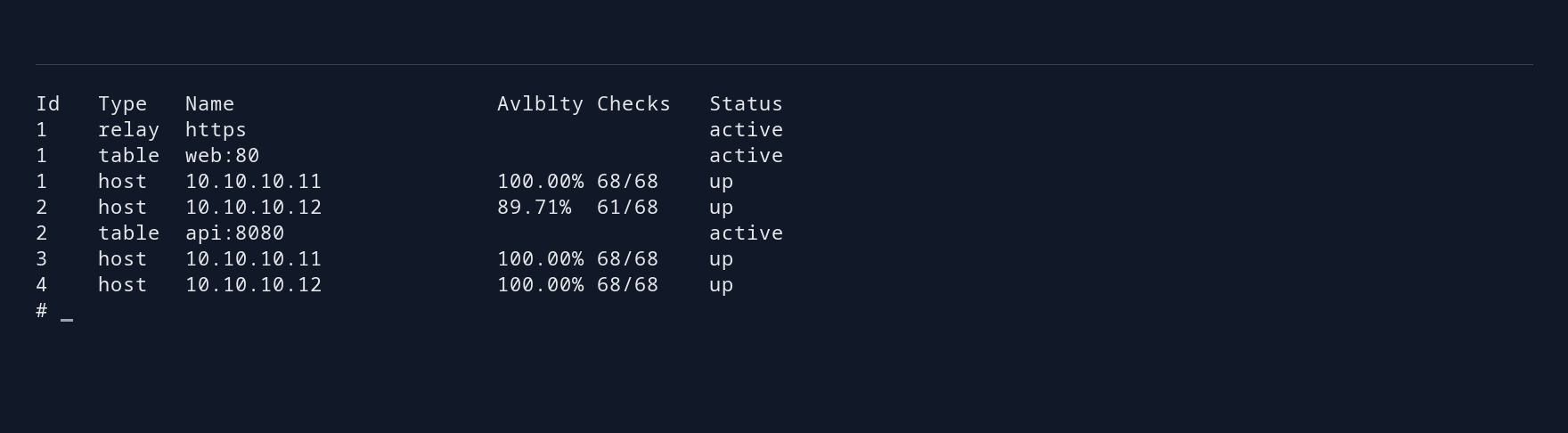
doas relayctl show summary
The shared PF policy
permits port 443 and the proxy’s backend connections. This mode does not use a PF rdr-to pool for the application connection.
Pass the Client Address to the Backend #
The backend sees the proxy as the source of the connection. The configuration replaces X-Forwarded-For with the connected client’s address, overwriting any value supplied by that client.
Configure the application to trust this header only from the known proxies, and block direct client access to the backends. For httpd, log style forwarded records the forwarded address alongside the network peer. Test a request containing a false forwarded address and inspect the backend log before relying on it for auditing or access decisions.
Check Health and Failure Behavior #
Resolve both example names to 198.51.100.100 on the client and trust the private CA, or use real DNS and publicly trusted certificates. Make repeated HTTPS requests to https://app.example/, https://app.example/api/ and https://api.example/. The first returns web1/web2; the other two return api1/api2. Next, make one health endpoint return a failure while its TCP port remains open. New requests should use the other backend after relayd detects the readiness failure. Restore it and check recovery.
For frontend failover, keep a TLS connection open and perform the controlled CARP takeover . Confirm that new HTTPS requests reach the standby. Check what happens to the original TLS connection as well.
Clients must reconnect when the active proxy fails. pfsync copies PF connection states, but it cannot transfer relayd’s TCP connections or TLS sessions to the standby. Check the application’s retry behavior: retrying a payment or another request that changes data can repeat the operation.
Automatic preemption can cause another proxy interruption when the preferred node returns. Plan when to return traffic to the preferred node to avoid an unexpected second interruption. A healthy backend pool does not detect every frontend failure; monitor the service from the client side as well as inspecting CARP state.
Inspect and Maintain #
doas relayctl show summary
doas relayctl show sessions
doas relayctl show relays
doas tail -f /var/log/daemon
Validate before reloading a change:
doas relayd -n
doas rcctl reload relayd
Round-robin selection spreads connections across servers, but some requests may take longer or transfer more data than others. Applications that need sessions to survive backend changes must share their session data or store it outside the selected backend. The relayd reference covers additional protocol options; the design comparison explains when packet forwarding is a better fit.