OpenBSD Handbook

    Theme
    • Part I. Install & Configure
      • Introduction to OpenBSD
      • Installing OpenBSD
      • The X Window System
      • Networking on OpenBSD
      • System Configuration
      • OpenBSD Basics
      • Managing Software: Packages and Ports
    • Part II. Daily Operations
      • OpenBSD Desktop Environments
      • Multimedia
      • Printing
      • Linux Compatibility
      • Windows Compatibility
      • Games
    • Part III. System Administration
      • Virtualization
      • Storage and File Systems
      • Updating and Upgrading
      • Localization
      • The OpenBSD Boot Process
      • Security
    • Part IV. Networking & Daemons
      • Services
        • Database
          • MariaDB
          • PostgreSQL
          • Redis
          • memcached
        • Directory
          • YP (NIS)
          • LDAP
        • File
          • NFS
          • Samba
        • FTP Services
          • ftpd
          • ProFTPD
          • vsftpd
          • Pure-FTPd
          • TFTP
        • Mail
          • OpenSMTPD Mail Server
          • Dovecot IMAP and POP3 Server
          • Postfix
          • Exim
          • Rspamd
        • Name
          • Unbound DNS Resolver
          • NSD Authoritative DNS Server
          • BIND DNS Server
        • Networking
          • OpenBGPD
          • rad
          • DHCP on OpenBSD
          • slaacd
        • Web
          • Apache HTTP Server
          • nginx Web Server
          • OpenBSD httpd Web Server
          • relayd Reverse Proxy
        • Logging
          • syslogd
        • Monitoring
          • SNMP
        • Remote Access
          • Audit OpenSSH
          • OpenSSH Server
        • File Synchronization
          • rsync
        • Messaging
          • RabbitMQ Message Broker
        • Time
          • NTP Time Synchronization
        • Load Balancing
          • Build Redundant Load-Balanced Gateways
          • Load Balance Services with NAT or DSR
          • Build an HA HTTPS Load Balancer
      • PF
        • pfctl cheat sheet
        • PF Anchors
        • PF Filter Rules
        • PF Forwarding
        • PF Lists and Macros
        • PF Load Balancing
        • PF Logging
        • PF NAT
        • PF Options
        • PF Policies
        • PF Shortcuts
        • PF Tables
      • Advanced Networking
        • High Availability and State Replication
        • Multi-WAN and Policy-Based Routing
        • VPN and Cryptographic Tunneling
        • Classic and Lightweight Tunnels
        • IPv6 at Scale
        • QoS and Traffic Shaping
        • MPLS and Label Distribution
        • Network Services at Scale
        • Virtualization and Host Networking
        • Large-Scale L2 and L3 Design
        • Telemetry, Logging, and Flow Export
        • Hardening and Operational Safety
        • Reference Architectures
        • Troubleshooting Playbooks
      • Serial Communication
    • Part V. Miscellaneous
      • Virtualization Cheat Sheet
      • OpenBSD Cheatsheet
      • How-to Guides
        • Installation and First Boot
          • Complete the First 30 Minutes After Installation
          • Check Hardware Compatibility Before Installing
          • Bootstrap Wi-Fi Firmware Without Ethernet
          • Run OpenBSD as a Virtual Machine Guest
          • Install OpenBSD on a VPS or Cloud Server
          • Install OpenBSD with Full-Disk Encryption
          • Dual-Boot OpenBSD on a UEFI System
          • Automate OpenBSD Installation with Autoinstall and PXE
        • Desktops and Laptops
          • Set Up OpenBSD as a Laptop or Workstation
          • Configure Laptop Power Management
          • Troubleshoot Web Browsers on OpenBSD
          • Use Plan 9 Tools on OpenBSD
          • Build a Minimal Desktop with suckless Tools
          • Install Z shell (zsh)
        • Networking and Remote Access
          • Create an Administrator Account with doas and SSH Keys
          • Configure Secure Remote Access with OpenSSH
          • Use FIDO Security Keys with OpenSSH
          • Configure Wi-Fi Roaming and Wired Failover
          • Troubleshoot PF, NAT, and Routing
          • Route Multiple VLANs with PF
          • Configure a Road-Warrior WireGuard VPN
          • Route IPv6 Networks without NAT
          • Test OpenBGPD with Two Providers
          • Unlock an Internal Service with an SSH Key
          • Build a Simple Router and Firewall
        • Servers and Services
          • Set Up WordPress on OpenBSD
          • Build a Mail Server with OpenSMTPD, Dovecot, and Rspamd
        • Security, Maintenance and Recovery
          • Establish a Conservative Security Baseline
          • Recover Access and Reset the Root Password
          • Collect OpenBSD Diagnostic Evidence
          • Troubleshoot Package Installation and Update Failures
          • Schedule Recurring Maintenance
          • Monitor an OpenBSD System
          • Back Up and Restore an OpenBSD System
          • Configure softraid RAID1
          • Recover an OpenBSD System That Does Not Boot
        • Building, Automation and Virtual Machines
          • Manage OpenBSD with Ansible
          • Build Third-Party Software from Ports
          • Build OpenBSD from Source
          • Plan a Docker Workload Migration to OpenBSD
      • OpenBSD for Linux Users
      • OpenBSD for FreeBSD Users
      • OpenBSD for macOS Users
    • OpenBSD FAQ
    • OpenBSD Architectures
      • OpenBSD Package Search
        • Synopsis
        • Assign Addresses
        • Configure Active and Standby
        • Permit Control and Routed Traffic
        • Verify Routing and Takeover
        • Share Forwarding with CARP IP Balancing
        • Troubleshooting

        Build Redundant Load-Balanced Gateways

        Synopsis #

        Configure two IPv4 gateways with shared addresses on the client and backend networks. Start with one active gateway and one standby. After routing and failover work, add CARP IP balancing if both gateways need to carry traffic.

        CARP IP balancing distributes traffic across gateways based on the source and destination IP addresses. It leaves the destination server unchanged. To select servers from a backend pool, use NAT or DSR . To route by HTTP hostname or path, use relayd proxying .

        Use console access while changing interfaces and filtering. Replace the example interfaces and addresses with those for the intended network. The sync network must be private to the pair or carried inside a protected transport.

        Assign Addresses #

        Two gateways, shared addressesA client uses the frontend shared address 198.51.100.100. Gateway A and Gateway B have separate physical addresses and synchronize PF states over a private network. The backends return through shared gateway 10.10.10.1. In active/standby mode both data VIPs belong to the same node.Two gateways, shared addressesClient: 198.51.100.10Shared frontend: 198.51.100.100Gateway AFront: 198.51.100.2Back: 10.10.10.2Sync: 10.255.0.1Gateway BFront: 198.51.100.3Back: 10.10.10.3Sync: 10.255.0.2CARP: active / standbyPrivate pfsync linkWeb1: 10.10.10.11 ยท Web2: 10.10.10.12Shared backend gateway: 10.10.10.1
        The active gateway holds both shared addresses. The private link copies PF connection states to the standby.
        RoleFrontend, vio0Backend, vio1Sync, vio2
        Gateway A198.51.100.2/2410.10.10.2/2410.255.0.1/30
        Gateway B198.51.100.3/2410.10.10.3/2410.255.0.2/30
        Shared address198.51.100.10010.10.10.1No shared address

        The client is 198.51.100.10/24. Its route to 10.10.10.0/24 uses 198.51.100.100. Backends 10.10.10.11 and 10.10.10.12 send replies to the client network through 10.10.10.1. The frontend shared address also serves the linked NAT, DSR and HTTPS examples.

        Configure the three physical interfaces persistently with hostname.if(5) . Give each gateway its own physical interface addresses. Add or update these entries in /etc/sysctl.conf on both gateways:

        net.inet.ip.forwarding=1
        net.inet.carp.preempt=1
        

        Apply them now:

        doas sysctl net.inet.ip.forwarding=1 net.inet.carp.preempt=1
        

        Configure Active and Standby #

        On A, create /etc/hostname.carp0:

        inet 198.51.100.100/24 vhid 101 carpdev vio0 pass lb-example advskew 0
        

        Create /etc/hostname.carp1:

        inet 10.10.10.1/24 vhid 102 carpdev vio1 pass lb-example advskew 0
        

        On B, use the same addresses, VHIDs and passphrase, with advskew 100 in both files. Replace lb-example with a private passphrase, using the same value on both gateways. Protect the files:

        doas chmod 600 /etc/hostname.carp0 /etc/hostname.carp1
        

        On A, /etc/hostname.pfsync0 contains:

        syncdev vio2 syncpeer 10.255.0.2 defer
        

        On B, use syncpeer 10.255.0.1. The defer option briefly queues an initial packet while its new state is synchronized, which is useful when either firewall may receive traffic.

        Bring up these interfaces on each node:

        doas sh /etc/netstart carp0 carp1 pfsync0
        

        Permit Control and Routed Traffic #

        Merge the following into the pair’s /etc/pf.conf. This example allows traffic between the client and backend networks. Restrict the rules to the required services before using them on a live network. The relayd/* anchor is used by the linked NAT and DSR guide.

        set skip on lo
        block all
        pass quick on vio2 proto pfsync keep state (no-sync)
        pass quick on { vio0 vio1 } proto carp keep state (no-sync)
        anchor "relayd/*" quick
        pass in on vio0 inet proto tcp to 198.51.100.100 port { 80 443 }
        pass in on vio0 inet from 198.51.100.0/24 to 10.10.10.0/24
        pass in on vio1 inet from 10.10.10.0/24 to 198.51.100.0/24
        pass out on { vio0 vio1 } inet
        

        Validate and load the rules on both nodes:

        doas pfctl -nf /etc/pf.conf
        doas pfctl -f /etc/pf.conf
        

        The quick anchor prevents later general pass rules from overriding the forwarding decision in a matching relayd rule. DSR needs this to preserve its route-to action.

        PF must be enabled. Existing gateways normally already have it enabled; confirm with doas pfctl -si. Keep the pair’s rules and interface names consistent. pfsync synchronizes states, not configuration files.

        Verify Routing and Takeover #

        Check ifconfig carp0 and ifconfig carp1 on both nodes. A should be MASTER for both shared addresses and B should be BACKUP. Fetch a known resource from 10.10.10.11 on the client, then inspect doas pfctl -ss on both gateways. Look for the same client/service connection, not merely a nonempty state table.

        Keep a file transfer or service connection open from the client, then temporarily lower A’s CARP priority:

        doas ifconfig -g carp carpdemote 128
        

        Check that B takes over both shared addresses and that new requests work. Check that the original connection continues without reconnecting. Restore only the demotion increment added for this test:

        doas ifconfig -g carp -carpdemote 128
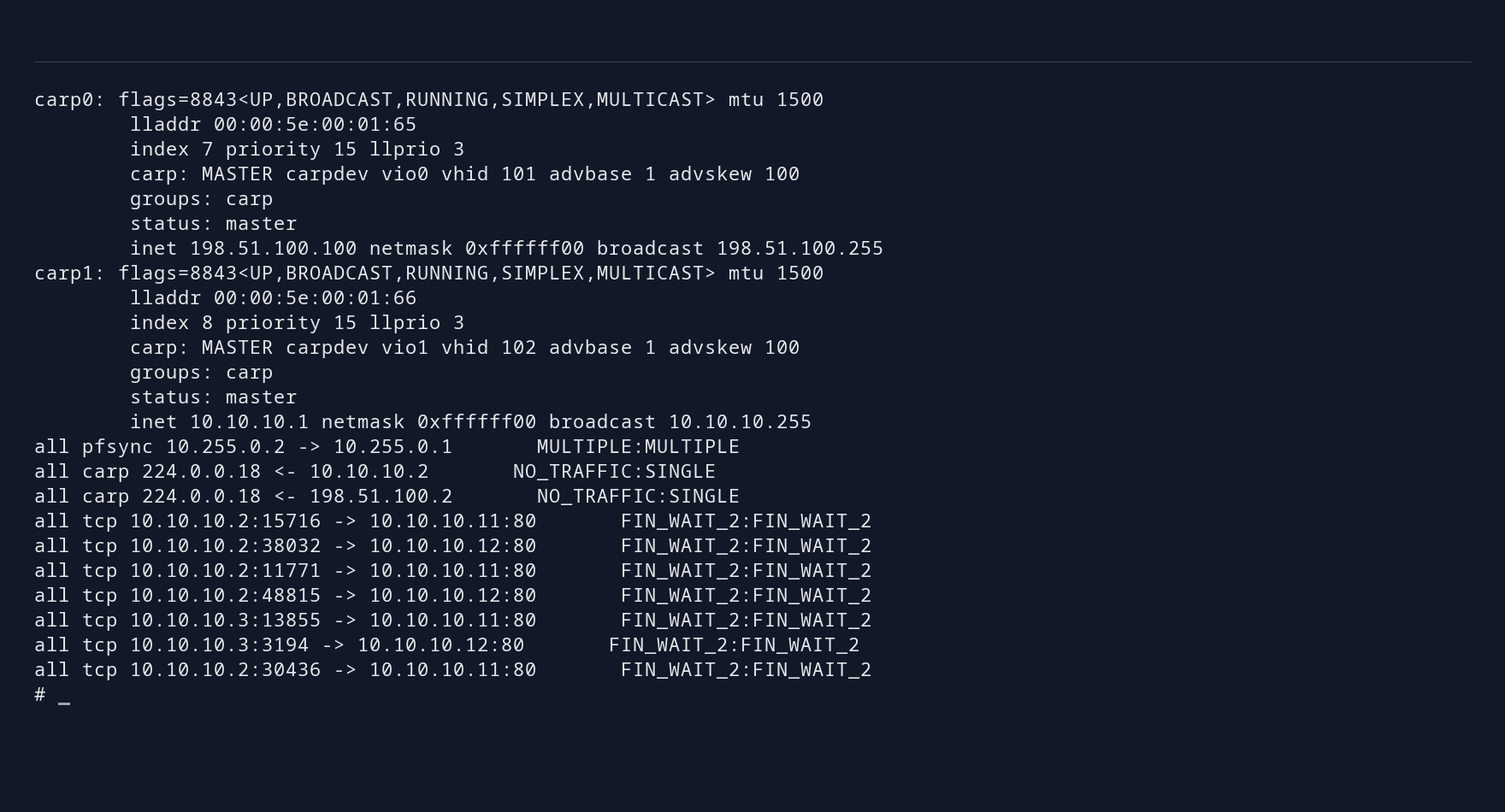
        
        Gateway B with advskew 100 is MASTER for both 198.51.100.100 and 10.10.10.1
        The standby has taken over both shared addresses. Verify client traffic separately from the CARP role display.

        Also test a shutdown of the active gateway. Check client traffic as well as the CARP roles. If a gateway loses access to the backend network while CARP remains active, monitoring may need to lower its CARP priority; see the HA reference .

        Share Forwarding with CARP IP Balancing #

        After the active/standby pair works, CARP can distribute address pairs across both nodes. Replace the CARP configuration with matching balancing groups on both sides. Use VHIDs that do not conflict with another CARP service on either segment.

        On A, the frontend file becomes:

        inet 198.51.100.100/24 carpdev vio0 pass lb-example carpnodes 201:0,202:100 balancing ip
        

        The backend file uses the same carpnodes list with address 10.10.10.1/24 and parent vio1. On B, use carpnodes 201:100,202:0 in both files. Restart the CARP interfaces from the console during a maintenance window to apply the change.

        Changing the balancing mode also changes the virtual MAC address. Check the adjacent client and backend gateway ARP entries after the transition. If they still contain the old MAC address, refresh the affected gateway entries or wait for them to expire. Restarting CARP may leave stale entries on neighboring machines.

        The source and destination IP addresses determine which gateway accepts a packet. Test with several client addresses: connections from one client to one server use the same gateway. Capture the same routed service traffic on both gateways and verify the reverse traffic uses the corresponding node.

        The switches must deliver frames for the shared multicast MAC address to both gateways. Check multicast handling and filtering on the switches that will carry the traffic. IP balancing does not increase a single connection’s bandwidth or check application health, and traffic volume may differ between gateways. Use active/standby when one gateway can handle the load.

        Troubleshooting #

        • Both nodes claim the same role: inspect VHIDs, passphrases, CARP advertisements and the L2 path.
        • Only one direction works: inspect client and backend routes before changing PF state policy.
        • No replicated connection: check the dedicated sync link, syncpeer, filtering and ruleset compatibility.
        • Takeover succeeds but the service fails: inspect the destination service and both data paths. pfsync cannot repair a failed backend or copy application state.
        • Only one gateway receives traffic in IP balancing mode: check that the switches deliver frames for the shared multicast MAC address to both gateways.
        Report a bug
        • Synopsis
        • Assign Addresses
        • Configure Active and Standby
        • Permit Control and Routed Traffic
        • Verify Routing and Takeover
        • Share Forwarding with CARP IP Balancing
        • Troubleshooting