Synopsis #
Use relayd(8) to check backend health and configure PF to distribute service connections across healthy servers. Begin with destination NAT, where replies cross the frontend, then change to direct server return (DSR), where replies bypass it.
The examples use IPv4 and a TCP web service so responses are easy to identify. PF forwards packets between the client and the selected server without terminating TLS or inspecting their HTTP requests. HTTP health checks are separate connections made by relayd.
Prepare the Shared Network #
Start with the addresses, CARP interfaces, pfsync link and PF rules from the redundant gateway guide
. Use active/standby mode for this example. The frontend service address is 198.51.100.100; the backend gateway is 10.10.10.1.
Configure servers 10.10.10.11/24 and 10.10.10.12/24. For NAT, both need a route to 198.51.100.0/24 through 10.10.10.1. Persist that route using hostname.if(5)
or the appropriate default gateway for the network.
On each backend, configure /etc/httpd.conf:
server "app.example" {
    listen on 0.0.0.0 port 80
    root "/htdocs/app"
    log style forwarded
}
Create a page that identifies the server and a health-check endpoint. On the second server, use web2 instead of web1:
doas install -d /var/www/htdocs/app
printf '%s\n' web1 | doas tee /var/www/htdocs/app/index.html
printf '%s\n' ok | doas tee /var/www/htdocs/app/health
doas httpd -n
doas rcctl enable httpd
doas rcctl start httpd
Permit the frontend health checks and intended client traffic in each backend’s PF policy. Check that each server responds directly before configuring the load balancer.
Start with NAT #
Use this /etc/relayd.conf on both frontends:
interval 2
timeout 1000
log state changes
table <web> { 10.10.10.11, 10.10.10.12 }
redirect "web" {
    listen on 198.51.100.100 tcp port 80
    forward to <web> port 80 mode roundrobin check http "/health" code 200
}
The relayd/* PF anchor must be present on both nodes. Validate the configuration, then enable and start the service:
doas relayd -n
doas rcctl enable relayd
doas rcctl start relayd
doas relayctl show summary
doas pfctl -a 'relayd/*' -sr
From the client, make repeated fresh requests:
for n in 1 2 3 4 5 6; do
    ftp -V -o - http://198.51.100.100/
done
Expect both backend identifiers while both hosts are healthy. The destination changes from the service IP to the selected server. Source NAT is not needed in this routed example, so the backend still sees the client’s address. Its reply returns through the translating firewall, which restores the service address as the source.
If replies do not reach the client, check the backend’s return route. Source NAT is an alternative when that route cannot be changed, but the backend then sees the translated source address instead of the client’s address.
Verify Health Checks and Frontend Failover #
Make one backend’s /health endpoint unavailable while leaving its normal page running. Confirm it becomes down in relayctl show summary, and that new requests use the other server. Restore the endpoint and observe its return to the pool.
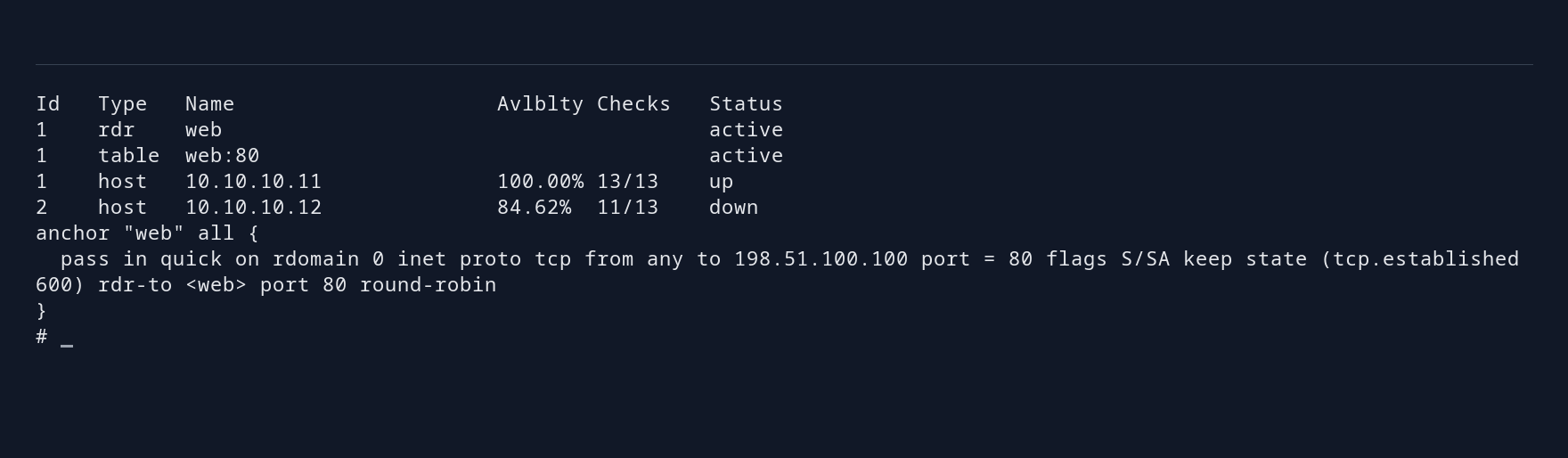
Choose a health endpoint that reports whether the application can handle requests. An open TCP port alone may not be enough. Measure recovery from the client: the check interval is only part of the delay before requests succeed again.
Hold a client connection open, confirm its translated PF state appears on both frontends, and perform the controlled CARP takeover . Check that the original connection continues without reconnecting and that new requests work. If the selected backend fails instead, clients must reconnect to another server; pfsync cannot transfer the backend’s connection or application state.
Change to Direct Server Return #
DSR retains the original destination IP. Each selected backend must accept traffic for 198.51.100.100, normally through a loopback alias, while only the frontend pair answers for that address on the client network.
On each standalone OpenBSD backend, add the service address to loopback and allow packets arriving on a physical interface to reach it:
doas ifconfig lo0 inet 198.51.100.100/32 alias
doas sysctl net.inet.ip.forwarding=2
Persist the loopback alias in /etc/hostname.lo0 and the sysctl in /etc/sysctl.conf, merging existing entries. Mode 2 permits delivery to local addresses arriving on another interface without enabling general non-IPsec forwarding. Keep forwarding mode 1 on routers.
Provide a return path that bypasses the balancers. In this example, add a second backend interface on 203.0.113.0/24: use .11 and .12 for the servers. A separate router has 203.0.113.254 on that network and 198.51.100.254 on the client network. It forwards between those networks and permits the reply traffic.
That return router sees replies without the initiating SYN. Ordinary stateful TCP rules can reject those packets. With vio1 facing the return network and vio0 facing the clients, the following narrow PF example permits the one-way HTTP replies:
set skip on lo
block all
pass in on vio1 inet proto tcp from 198.51.100.100 port 80 \
    to 198.51.100.0/24 flags any no state
pass out on vio0 inet proto tcp from 198.51.100.100 port 80 \
    to 198.51.100.0/24 flags any no state
Merge required administration and ICMP policy separately. Keep these stateless rules limited to HTTP replies on the return router. Each backend still sees both directions of its own connections and can filter them statefully.
Replace each backend’s route to the client network:
doas route delete -net 198.51.100.0/24
doas route add -net 198.51.100.0/24 203.0.113.254
Persist the changed route. The service must listen on the loopback VIP as well as the address used by the health checks; the wildcard listener above covers both.
On both frontends, disable pfsync initial-packet deferral for this DSR configuration:
doas ifconfig pfsync0 -defer
Replace defer with -defer in each /etc/hostname.pfsync0. PF states still synchronize; initial packets are no longer held for a peer acknowledgment. Keep the quick relayd anchor from the gateway guide.
On both frontends, replace only the forward to line inside the redirection with:
route to <web> port 80 mode roundrobin check http "/health" code 200 interface vio1
Validate and reload:
doas relayd -n
doas rcctl reload relayd
doas pfctl -a 'relayd/*' -sr
Existing NAT states are not converted into DSR states by a reload. Test DSR with new connections. During a live migration, allow old connections to finish before removing the NAT configuration; avoid clearing unrelated PF states.
Check the Request and Reply Paths #
Capture the backend-facing link on the frontend:
doas tcpdump -n -i vio1 'tcp port 80 and host 198.51.100.10'
For NAT, requests have the selected backend as their destination and replies cross this link. For DSR, requests still have 198.51.100.100 as their destination; replies should appear on the separate return router instead. Check backend access logs for the actual client address and compare the response body on the client.
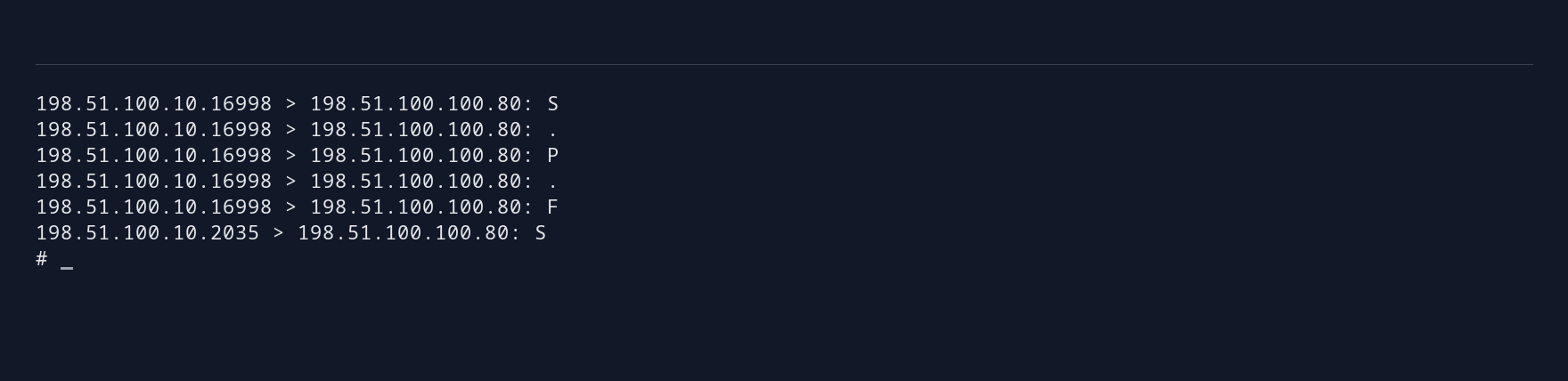
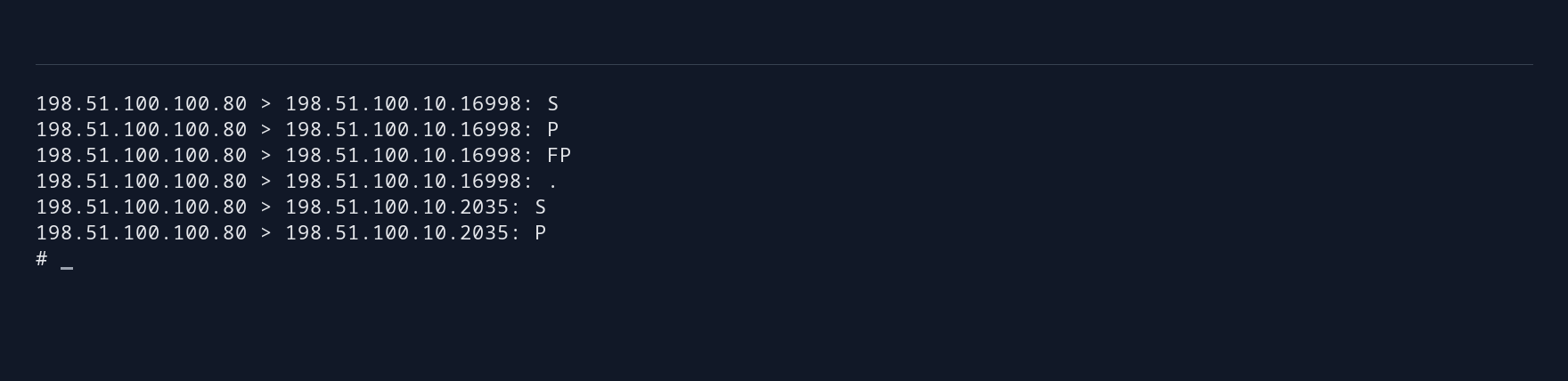
The DSR frontend sees requests but not replies. Inspect relayd’s generated PF rules and verify that traffic passes; keep stateful filtering for unrelated services. Repeat the backend health and frontend takeover tests in DSR mode. During takeover, check that an open client connection continues to reach the same backend without reconnecting.
Choose Between the Designs #
NAT is usually the simpler starting point when both directions can traverse the frontend. DSR removes replies from that path, which can help with response-heavy services, but requires changes to backend addressing and routing. Troubleshooting requires captures on both the frontend and the return router.
For HTTP path routing or TLS termination, use the HTTPS proxy guide . Application sessions and persistent data need their own sharing or replication strategy with any of these designs. See the design comparison for help choosing.